Fill in Florida's Uniform Mitigation Verification Inspection Form (OIR-B1-1802) on your Android tablet, question by question, and hand over a clean PDF on the official form layout – often before you leave the property.

Wind mitigation reports are all about getting the details right: the right permit date, the right roof-to-wall answer, the weakest opening protection. Multi Point Pro lays the form out the way you already know it, so you're not hunting through a generic checklist to find the question the insurance company cares about.
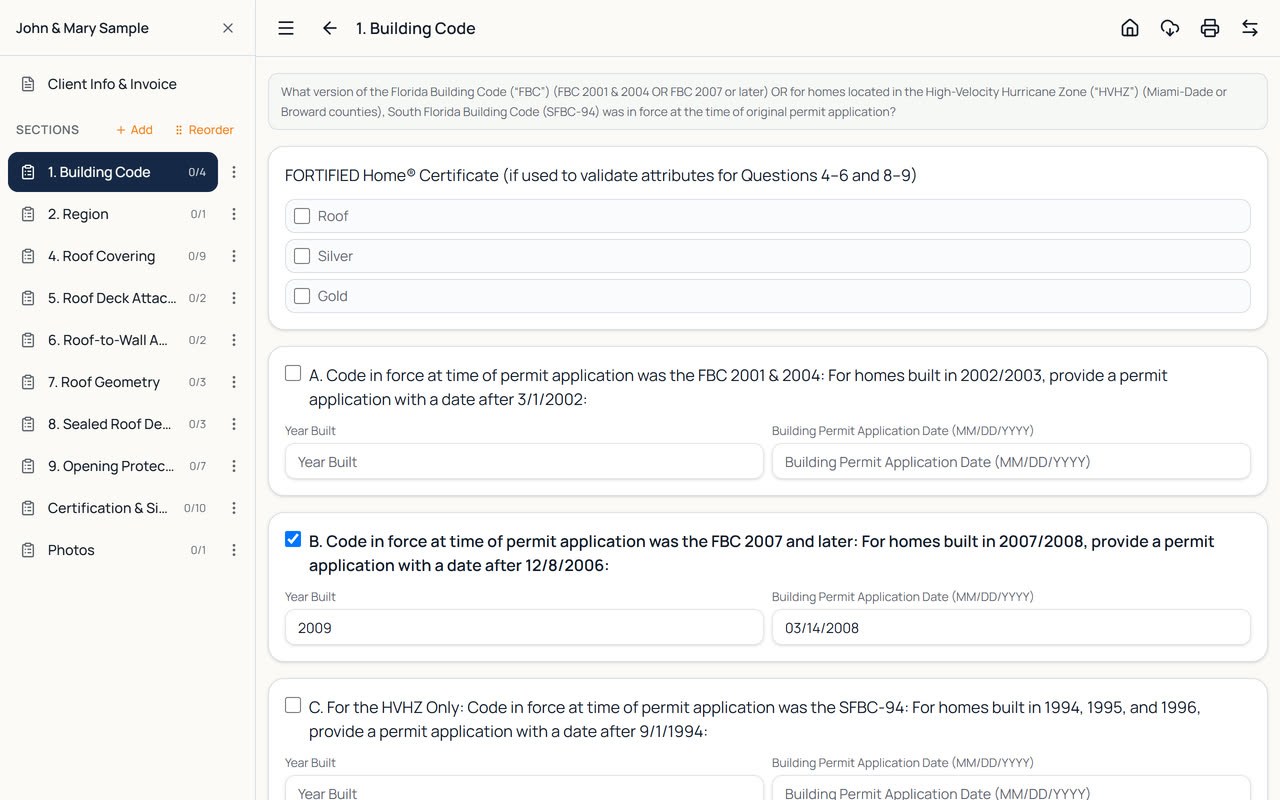
Each section of the app follows a section of the form, and each question shows the form's own wording at the top. Tick the lettered answer that applies, then type in any years, permit application dates or product approval numbers right under it.
Small things that save minutes on every report – and add up over a busy week.
No paraphrased questions. You see the same lettered answers that print on the form, so what you tick is exactly what the underwriter reads.
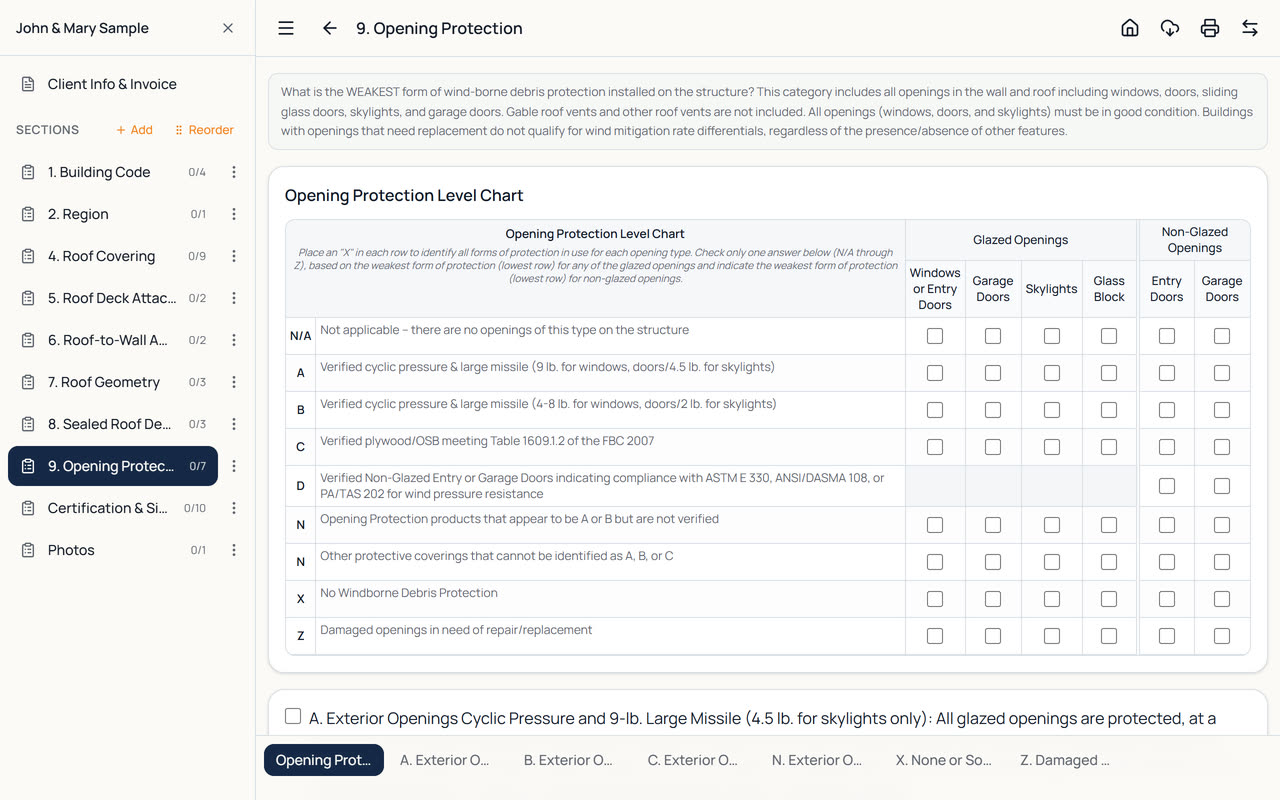
Mark windows, entry doors, garage doors, skylights and glass block against each protection level in a grid that matches the form's chart.
The Pitch button uses the tablet's camera and tilt sensor. Line up the orange line with the roof edge and the photo is saved with the pitch drawn on it.
Screenshot adds a picture of a permit record or property appraiser page. Each one prints in its own half-page box at the end of the report.
Your name, license, company, phone and signature come from Settings and fill the certification section automatically. Change them on one report when you need to.
Doing a 4-Point too? One inspection holds the Wind Mitigation, 4-Point, Standard and Texas TREC reports for the same client – switch with one tap.
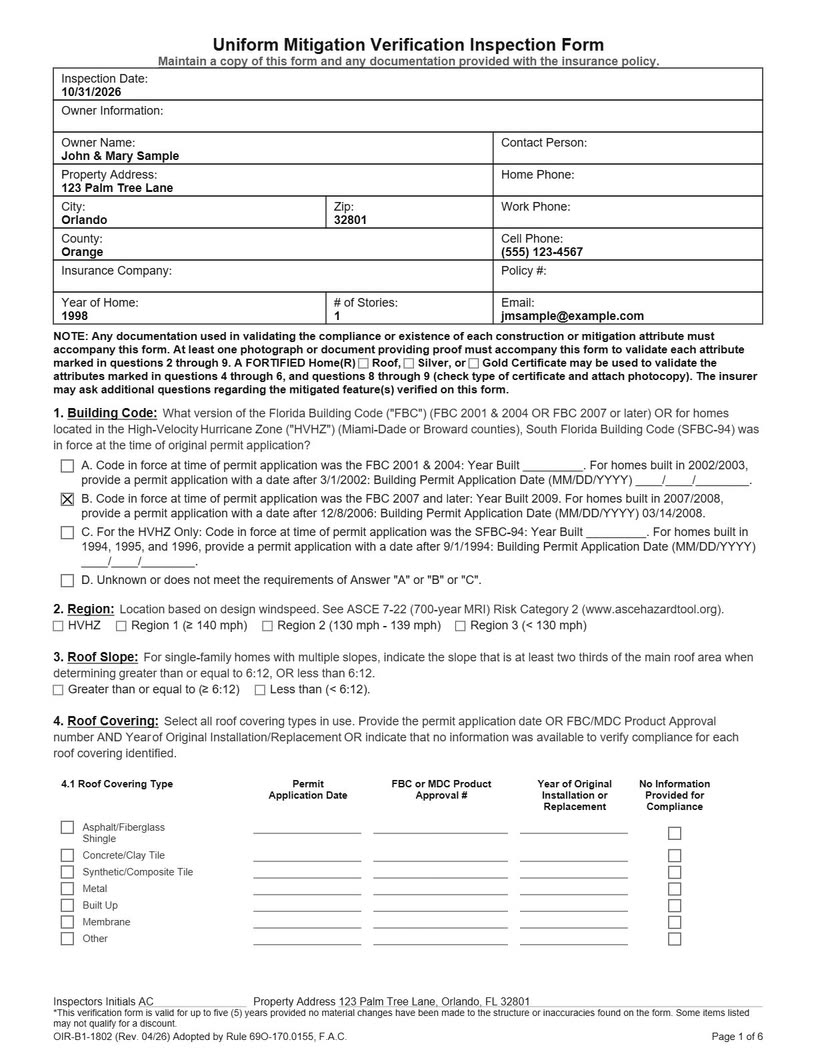
When you tap the printer button, the Wind Mitigation report is printed the way the paper form looks: the same boxed sections, checkbox positions and footer, with your answers filled in. It isn't squeezed into a generic report template, so it's quick for an agent or underwriter to check.
You can put your own branded cover page in front of it (with your logo, company details and the property photo), and your inspection photos follow the form. On a tablet the PDF opens straight away, ready to email, share or print.
Forms and insurer requirements change from time to time. You're responsible for checking that each report meets the current requirements of your license and the insurers you work with.
Roof-to-wall connections are checked from the attic, and attics rarely have good reception. Multi Point Pro stores everything on the tablet and saves as you type, so there's no Save button to forget and nothing lost when the signal drops.
Save a backup to the tablet or send it to email or cloud storage whenever you like. On the Tablet + Web plans your inspections also sync to the web version, so the office can finish paperwork while you drive to the next job.
New to the app? The how-to video on Wind Mitigation and 4-Point reports shows the whole flow in about a minute, and the User Guide covers every option.
Three steps from the driveway to the insurance company.
Tap New Inspection, enter the client and property, and choose Wind Mitigation (OIR-B1-1802) as the report type.
Work through the form section by section. Add photos, measure roof pitch and attach permit screenshots as you go.
Tap the printer button. The report is ready on the official layout, with your signature and license details.
Yes. The Wind Mitigation report follows form OIR-B1-1802 question by question, with the form's own wording, and the PDF reproduces the form's layout. Forms and insurer requirements change, so check that each report meets your insurer's current requirements.
Yes. One inspection can hold the Wind Mitigation, 4-Point, Standard Home Inspection and Texas TREC reports for the same client. The client's details are shared, and each report keeps its own answers.
Yes. Take photos with the camera or add them from your gallery, measure roof pitch with the Pitch tool, and add screenshots of permit records or property appraiser pages. They are all included in the PDF.
Yes. Enter your name, license details, company and signature once in Settings and they fill in the Certification section of every Wind Mitigation report. You can override them on a single report.
Yes. After you sign in once, you can complete inspections and create PDF reports with no connection – your work is stored on the tablet and saved as you type. You only need internet for sync, the AI writing help, and emailing or sharing reports.
Every new account gets a 14-day free trial with every feature and no card needed. After that, plans start at $29 a month (or $290 a year) for one inspector on one tablet. See the pricing page for the Tablet + Web and AI plans.
Every plan includes all four report types.
Home inspection report app for Android tablets: checklists, photos with markup, canned comments, invoices and branded PDF reports. Works offline.
4-point inspection app for insurance inspections: roof, electrical, plumbing and HVAC on your tablet, with photos and a PDF on the 4-Point form layout.
Texas home inspection software for the TREC Property Inspection Report REI 7-6: I/NI/NP/D boxes, comments and photos on your tablet, PDF on the form.
Every feature included, no card needed. Plans from $29 a month after that.